
ChatGPT, General, Hockey, New Product, News
Gargoyles: 30 ChatGPT Hockey Jerseys in 30 Days

May
The What
Welcome to the next installment of the series! Day 3 of 30. For this particular concept we centered our approach for a team design of the mythical and gothic ‘Gargoyles‘. As you may be aware, many of our retail designs are with mythical beasts in mind, so why not bring a new one into the family?
How We Prompted ChatGPT
To start this one out we asked a simple question to see where it took us: ‘Can you help me make a hockey jersey logo?’. The response we got offered up a series of questions for helping establish the end results. Here’s the prompt we ultimately settled on to start this one: ‘I want to make a logo for a team called ‘Gargoyles’ – want it to be a mascot logo in a modern/minimal style crest. The crest shape can follow the shape of the mascot logo that is developed, it can also have a border with one or two outlines. For the logo mascot, make a stone gargoyle perched on what can be barely seen as gothic architecture. I don’t have a color set, pick one for me – colors should be contrasting. Please only use a maximum of 4 hex colors for the logo. Logo only, don’t include the text please. Please keep the image clean and free from grain/mottling.’
This was one of our earlier approaches in the experimentation so we weren’t doing as much with pose instruction just yet. In the link below for the prompting, you’ll see where it started and we requested additional design elements within the crest background to mimic the night sky. Little touches like that can really help to elevate your concept and add additional life – it also helps it to feel less A.I. generated in our eyes.
Links to the prompt exchange history:
For most use cases, we went with the minimal mascot style logo direction. ChatGPT knows what this is and will mimic the style pretty well. This ensures flat and clean lines with no shading or soft edges. That’s important, we’ll explain why. The final artwork needs to be this way so that we can create a vector image out of the PNG file that ChatGPT provides to you after it renders your ideas. We take the file and load it into a vectorization tool (we recommend vectorizer.ai and Vector Magic to accomplish this on your own – otherwise we can do that step for you after you order – you’re also free to explore other options) to separate the shapes into vectors so that we can colorize freely. This also ensures that we are able to scale the artwork without the loss of resolution. More on that here.
You can request a crest shape to act as a container for your logo, or explicitly ask to not include one. At times we asked for no crest shape since we wanted to have control on that piece on our end after the logo is created. You can also prompt ChatGPT for suggestions – it can really help steer your creative direction.
Be sure to direct the prompt with specific information if you have it – like what sort of emotion you want, what pose, overall shape, and what items the logo should have (i.e. hockey gloves, hockey skates, hockey stick, etc.). ChatGPT will answer your questions in a similar pattern, but with variance each time – so it can be helpful to ask many questions to see where you end up.
For text, it does a decent job with rendering it out – you will likely experience some anomalies and artifacts with the text, it’s improved in this regard immensely in the time we started using to now. You can choose to let it be generated or to exclude it – just be sure to know what you want to do going into it. We suggest going without it first and adding it when requesting revisions. Experimenting will obviously get you better and better results as you learn how best to get what you want.
Ask for colors you’d like to include. Give general direction with terms like primary, analogous, monochromatic, contrasting – you can even let ChatGPT pick them for you. It’s good to limit the total number of colors in the logo as well – this helps for many reasons. Results in a cleaner file and better contrast. We recommend a maximum of 5-6 colors. Through some experimentation we found that adding the ‘no grain or mottled results’ in the prompt really helps to keep the final image from looking like it has a texture to it.
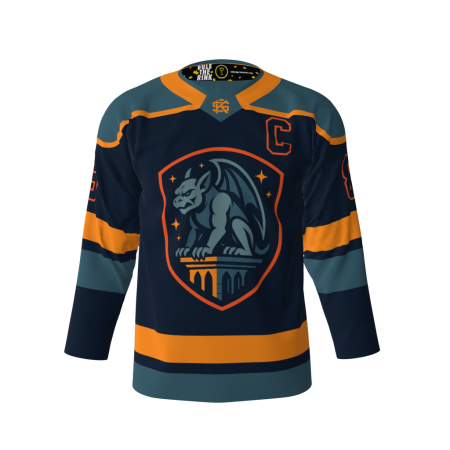
Final Gargoyles Hockey Jersey Results/Product
In the end we kept the second prompt’s direction and asked for a few changes. In the same thread you’ll find the evolution and a couple uniform concepts based on our chat history.
We didn’t need to make any modifications to the final ChatGPT export, it reflects the original A.I.-generated concepts. You can explore more of the logo variations from our process in the gallery below. As always, this project is about exploring creative possibilities—not replacing the work of skilled illustrators.
As you may or may not be aware, we are releasing a new design concept daily. Be sure to order yours now and check out the rest of the collection as it grows! Provide feedback and share your own results as well!


Hockey